

Md Firoz Ahmed™
Super VIP Member
Making The 9008 USB Cable Into The EDL COM 9008 For The Qualcomm (Xiaomi, LG, Samsung, ...)
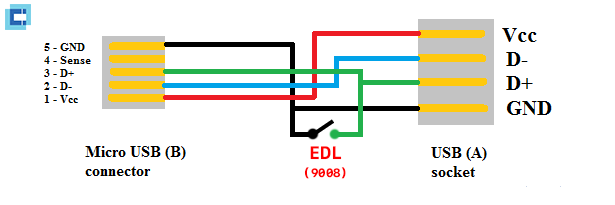
Making The 9008 USB Cable Into The EDL COM 9008 For The Qualcomm (Xiaomi, LG, Samsung, ...)
USB cable GUIDING 9008 put the machine on the mode EDL
Prepare :


In case there is no switch, use the hand to connect / connect 2 D + and GND, then plug the head and the remaining USB cable to the phone, for a few seconds to disconnect the two D + and GND phone will enter the EDL mode 9008
Happy brothers!:


Making The 9008 USB Cable Into The EDL COM 9008 For The Qualcomm (Xiaomi, LG, Samsung, ...)
USB cable GUIDING 9008 put the machine on the mode EDL
Prepare :
- Cable MicroUSB cable or USB-C
- Single switch
- Knife to separate the cable sheath
- Screw-drivers for removing switches, ...
- Technical explanation:
- USB cable has 4 fibers including: VCC (+ 5V) , D- , D + and GND.
- When connecting two D + and GND fibers together and plug into the phone, EDL mode (on the COM 9008 port driver)
In case there is no switch, use the hand to connect / connect 2 D + and GND, then plug the head and the remaining USB cable to the phone, for a few seconds to disconnect the two D + and GND phone will enter the EDL mode 9008
Happy brothers!: