

- Joined
- Mar 24, 2017
- Messages
- 1,066
- Reaction score
- 404
- Points
- 84
- Age
- 37
- Location
- dhaka
- Website
- shamimtel.com
SAMSUNG SM-G570F UNLOCK DONE BY Z3X
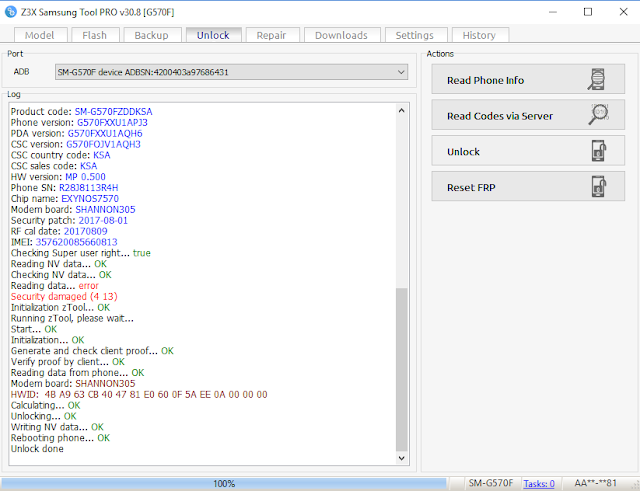
UNLOCK INSTRUCTIONS:
Phone must be rooted!
If the software can't root the phone automatically,
then you must root your device manually.
1. Power on the phone.
2. Tap 7 times on 'Build number' in 'Settings'-'About phone' to enable 'Developer options',
go to 'Settings'-'Developer options' and enable 'USB debugging'.
3. Connect the phone to PC with USB cable, install drivers if needed.
4. Select device in ADB settings.
5. Press 'Unlock' button and select 'New Unlock' for direct unlock.
Reading codes using sever:
Warning! Knox warranty must be active (0x00)!
If you have it voided (0x01(void)), then you can't unlock this phone using sever.
1. Power on the phone.
2. Type *#0808# and select 'DM+MODEM+ADB'.
3. Connect the phone to PC with USB cable, install drivers if needed.
4. Press 'Read Codes via server' button, write your login and password in window if it will appear.
(Login and password will be saved as default after first input and can be changed in settings)
To reset Google account activation lock:
1. ADB must be activated in any way (you can flash sBoot from combination firmware,
make sure, that you are not upgrade sBoot).
2. Connect the phone to PC with USB cable, install drivers if needed.
3. Select device in ADB settings.
4. Press 'Reset FRP' and follow the instructions in program.
5. When process done, press 'Back' on phone and perform factory reset from phone settings.
Operation: Unlock
Selected model: SM-G570F
Software version: 30.8
Waiting ADB device... OK
Reading phone info...
Model: SM-G570F
Android version: 6.0.1
Product code: SM-G570FZDDKSA
Phone version: G570FXXU1APJ3
PDA version: G570FXXU1AQH6
CSC version: G570FOJV1AQH3
CSC country code: KSA
CSC sales code: KSA
HW version: MP 0.500
Phone SN: R28J8113R4H
Chip name: EXYNOS7570
Modem board: SHANNON305
Security patch: 2017-08-01
RF cal date: 20170809
IMEI: 357620085660813
Checking Super user right... true
Reading NV data... OK
Checking NV data... OK
Reading data... error
Security damaged (4 13)
Initialization zTool... OK
Running zTool, please wait...
Start... OK
Initialization... OK
Generate and check client proof... OK
Verify proof by client... OK
Reading data from phone... OK
Modem board: SHANNON305
HWID: 4B A9 63 CB 40 47 81 E0 60 0F 5A EE 0A 00 00 00
Calculating... OK
Unlocking... OK
Writing NV data... OK
Rebooting phone... OK
Unlock done
Done with Samsung Tool PRO v.30.8
UNLOCK INSTRUCTIONS:
Phone must be rooted!
If the software can't root the phone automatically,
then you must root your device manually.
1. Power on the phone.
2. Tap 7 times on 'Build number' in 'Settings'-'About phone' to enable 'Developer options',
go to 'Settings'-'Developer options' and enable 'USB debugging'.
3. Connect the phone to PC with USB cable, install drivers if needed.
4. Select device in ADB settings.
5. Press 'Unlock' button and select 'New Unlock' for direct unlock.
Reading codes using sever:
Warning! Knox warranty must be active (0x00)!
If you have it voided (0x01(void)), then you can't unlock this phone using sever.
1. Power on the phone.
2. Type *#0808# and select 'DM+MODEM+ADB'.
3. Connect the phone to PC with USB cable, install drivers if needed.
4. Press 'Read Codes via server' button, write your login and password in window if it will appear.
(Login and password will be saved as default after first input and can be changed in settings)
To reset Google account activation lock:
1. ADB must be activated in any way (you can flash sBoot from combination firmware,
make sure, that you are not upgrade sBoot).
2. Connect the phone to PC with USB cable, install drivers if needed.
3. Select device in ADB settings.
4. Press 'Reset FRP' and follow the instructions in program.
5. When process done, press 'Back' on phone and perform factory reset from phone settings.
Operation: Unlock
Selected model: SM-G570F
Software version: 30.8
Waiting ADB device... OK
Reading phone info...
Model: SM-G570F
Android version: 6.0.1
Product code: SM-G570FZDDKSA
Phone version: G570FXXU1APJ3
PDA version: G570FXXU1AQH6
CSC version: G570FOJV1AQH3
CSC country code: KSA
CSC sales code: KSA
HW version: MP 0.500
Phone SN: R28J8113R4H
Chip name: EXYNOS7570
Modem board: SHANNON305
Security patch: 2017-08-01
RF cal date: 20170809
IMEI: 357620085660813
Checking Super user right... true
Reading NV data... OK
Checking NV data... OK
Reading data... error
Security damaged (4 13)
Initialization zTool... OK
Running zTool, please wait...
Start... OK
Initialization... OK
Generate and check client proof... OK
Verify proof by client... OK
Reading data from phone... OK
Modem board: SHANNON305
HWID: 4B A9 63 CB 40 47 81 E0 60 0F 5A EE 0A 00 00 00
Calculating... OK
Unlocking... OK
Writing NV data... OK
Rebooting phone... OK
Unlock done
Done with Samsung Tool PRO v.30.8